
Stop sharing raw screenshots.
The screenshot beautifier for Windows & Mac.

DoublShot captures and automatically beautifies your screen with perfect padding, shadows, and backgrounds.

Free to try,
$14.99 $24.99 Lifetime license

No cloud. No telemetry. One license covers Windows & Mac.

Quick capture:
Ctrl + Shift + S

Look professional without trying.

The dedicated screenshot tool Windows users have been waiting for, and it works on Mac, too.

Auto-gradient matching

DoublShot analyzes the colors in your capture and automatically assigns a complementary background gradient. You just paste.

Full annotation toolkit

Draw, highlight, add arrows, insert text, and drop emojis directly on your screenshots. Perfect for pointing things out without leaving the app.

Granular beautification control

Customize shadows, padding, corner rounding, and backgrounds exactly how you want them. Every detail is adjustable.
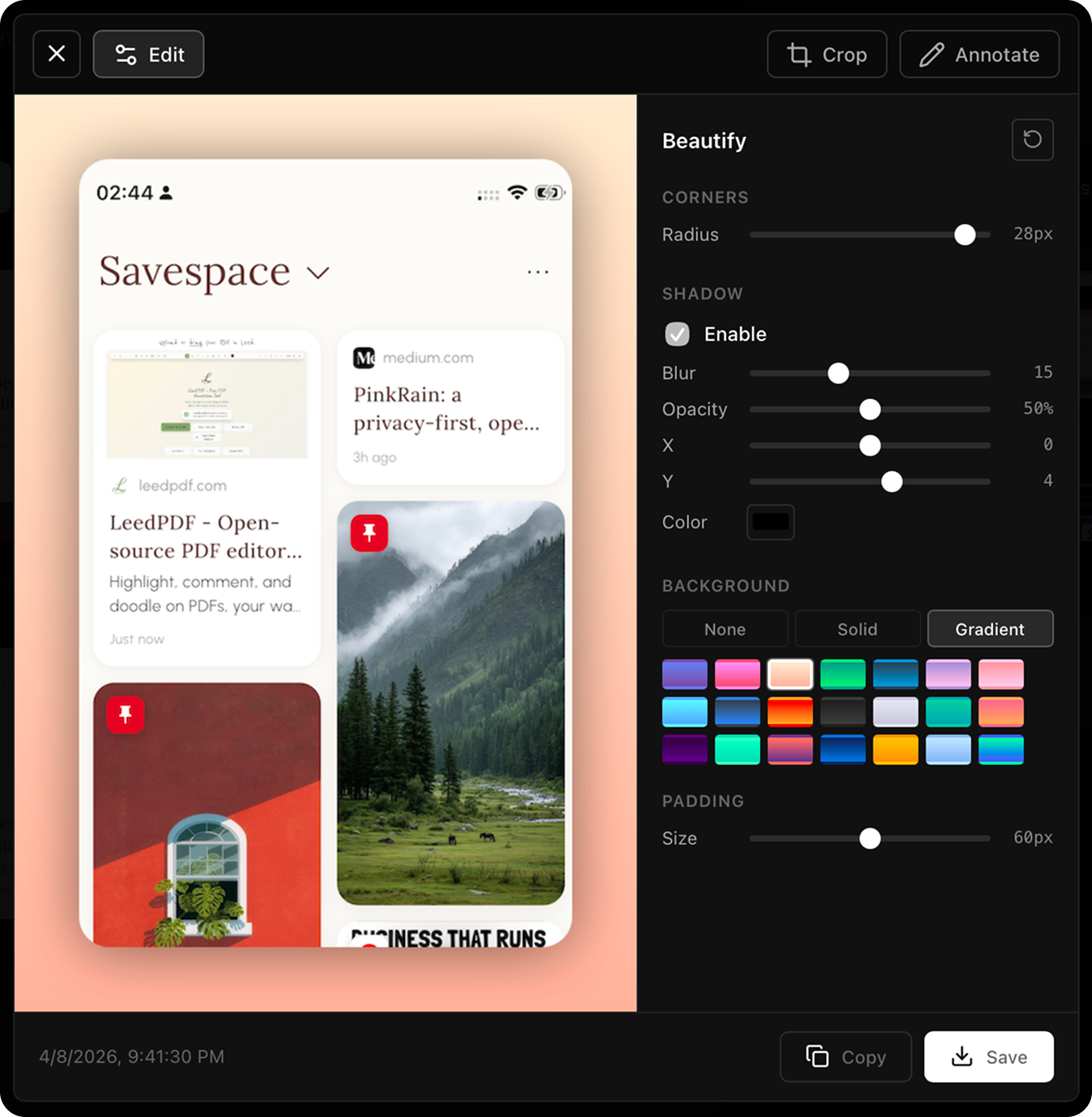
Integrated workflow

Self-timer, auto-save to folder, auto-copy to clipboard, and an in-app gallery to review all your captures.

Locally processed

Everything happens entirely on your device. No cloud processing, no forced accounts, and zero telemetry.

Window, area, or full screen

Global shortcuts instantly capture what you need. The beautified result drops straight to your clipboard, ready to share.

Hit the shortcut. Paste a finished image.

Ctrl + Shift + S

Auto-styled & copied

Own your tools again.

No subscriptions. No cloud accounts. Just a lightweight, dedicated tool that makes your work look better on Windows and macOS.

Download for Windows
$14.99
$24.99 40% OFF

Version 1.4.1 · Windows 10/11 · ~2.5 MB

Version 1.4.1 · macOS 13+ · ~3 MB

Free to try with a tiny watermark. $14.99 to own it forever.

The details.

The essentials about DoublShot.

What does DoublShot do?
It replaces your default screenshot tool. DoublShot captures your screen and automatically applies professional styling—like padding, corner rounding, and complementary backgrounds—before copying the final image to your clipboard.
Does DoublShot send my screenshots anywhere?
Never. The app operates entirely offline. There is no telemetry, and your screenshots never leave your local machine.
Where are my screenshots saved?
They go straight to your clipboard for instant pasting. You can also set DoublShot to save them locally to a folder of your choice.
Is DoublShot really free?
DoublShot is free to use for as long as you want. It includes all functionality but adds a tiny watermark to your exported images. Purchasing a license removes the watermark permanently.
Can I add text or annotations to my screenshots?
Absolutely. DoublShot includes a full annotation toolkit—draw with a pencil, add arrows, insert text, use the eraser, highlight areas, and even drop emojis directly on your screenshots. You can annotate right in the app before saving or sharing.
What are the system requirements?
Windows 10/11 or macOS 12 and newer. It’s a highly optimized, lightweight app that runs quietly in the background without draining your battery or hogging memory.